

Adobe Photoshop CC





- Description
- Curriculum
- Reviews
Adobe Photoshop CC
This course provides a comprehensive introduction to Adobe Photoshop CC, one of the most powerful and widely used image editing and graphic design software tools in the creative industry. Whether you are a beginner or someone with basic knowledge, this course will guide you through essential tools, techniques, and workflows to create professional-quality designs, edits, and digital artwork.
Throughout the course, students will learn how to navigate the Photoshop interface, work with layers, apply adjustments, and use advanced editing techniques. The course is designed to help learners develop both technical skills and creative confidence in using Photoshop for a wide range of design projects.
Key Learning Outcomes:
Introduction to Photoshop:
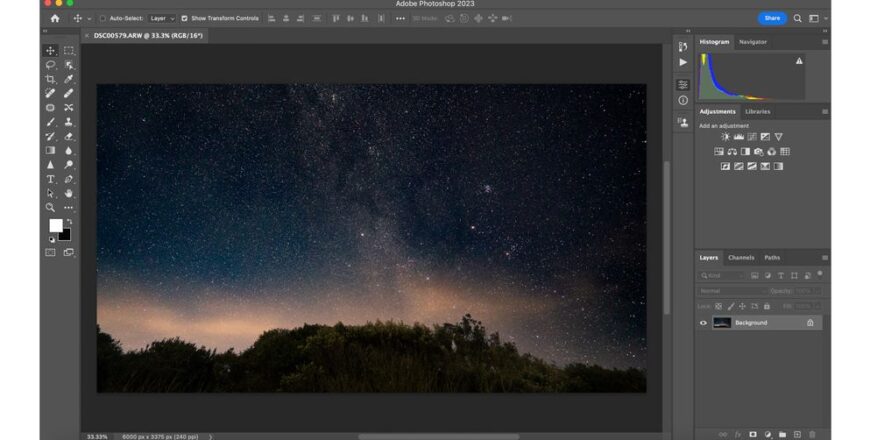
Understand the fundamentals of Adobe Photoshop CC, including its interface, tools, and workspace. Learn how Photoshop is used in graphic design, photography, and digital art.
Working with Tools and Panels:
Explore essential tools such as selection tools, brush tools, crop tools, and text tools. Learn how to efficiently use panels like Layers, Properties, and Adjustments.
Layers and Masking:
Gain a deep understanding of layers, layer styles, blending modes, and masks. Learn how to organize and edit designs non-destructively.
Image Editing and Retouching:
Learn professional techniques for photo editing, including color correction, retouching, removing imperfections, and enhancing image quality.
Text and Typography:
Understand how to work with text, fonts, and typography to create visually appealing designs for posters, social media, and branding.
Creating Designs from Scratch:
Get hands-on experience designing graphics such as social media posts, banners, flyers, and basic logos using Photoshop tools and techniques.
Filters and Effects:
Explore Photoshop filters and effects to enhance your designs. Learn how to apply creative effects and customize visuals.
Working with Colors and Gradients:
Learn color theory basics, gradient usage, and how to create visually balanced and attractive compositions.
Exporting and File Formats:
Understand different file formats (JPEG, PNG, PSD, etc.) and how to export designs for web, print, and social media.
Real-World Projects:
Apply your skills through practical projects that simulate real-world design tasks.
Challenges and Limitations:
Understand common challenges beginners face in Photoshop, such as complex tools and workflow management. Learn how to overcome these challenges with practice and proper techniques.
Ethical and Professional Considerations:
Discuss ethical practices in design, including proper use of images, copyright awareness, and maintaining originality in creative work.
Future Opportunities with Photoshop:
Explore career opportunities in graphic design, photo editing, digital marketing, and freelancing using Photoshop skills.
Who This Course is For:
- Beginners who want to learn graphic design and photo editing from scratch
- Students interested in building creative digital skills
- Freelancers looking to offer design services
- Content creators and social media managers
- Anyone interested in learning Adobe Photoshop CC for personal or professional use
By the end of this course, participants will have a strong foundation in Adobe Photoshop CC and the ability to create high-quality visual content. Whether you aim to become a professional designer or simply enhance your creative skills, this course will equip you with the tools and confidence to succeed.
-
1
 1 Tools
 -
2
2 Tools Type
-
3
3 Sponge Tool
-
4
4 Smudge Tool
-
5
5 Shape Tools
-
6
6 Rulers Tool
-
7
7 Red Eye Tool
-
8
8 Perspective Warp Tool
-
9
9 Pen Tool
-
10
10 Patch Tool
-
11
11 Note and Count Tool
-
12
12 Move Tool
-
13
13 Lasso Tool and Polygon Lasso Tool
-
14
14 Magnetic Lasso Tool
-
15
15 Content Aware Tool
-
16
16 Liquify Tool
-
17
17 Layers Panel
-
18
18 History brush and Art History Brush Tool
-
19
19 Hand Tool and Rotate View Tool
-
20
20 Gradient Tool
-
21
21 Frame Tool
-
22
22 Eye dropper and Colour Sampler Tool
-
23
23 Eraser Tool
-
24
24 Dodge and Burn Tool
-
25
25 Crop Tool and Perspective Crop Tool
-
26
26 Clone Stamp Tool and Pattern Stamp Tool
-
27
27 Blur and Sharpen Tool
-
28
28 Art board Tool
-
29
29 Puppet Warp Tool
-
30
30 Stylize Filters
-
31
31 Raster Image
-
32
32 Pixelate Filters
-
33
33 Layers Panel
-
34
34 Filter Gallery
-
35
35 Camera Raw Filter
-
36
36 Blur Gallery
-
37
37 Adjustment Layer
-
38
38 3D Filter
-
39
39 Quick Selection Tool and Magic Wand Tool
-
40
40 Layer Mask
-
41
41 Spot Healing and Healing Brush
-
42
42 Rectangular and Elipitical Marquee Tool
-
43
2.1 3D Text Manipulation
-
44
2.2 Anime Effect
-
45
2.3 Blending 2 images - 1 composition
-
46
2.4 Bokeh Effect
-
47
2.5 Book Manipulation Effect
-
48
2.6 Burning Rose Effect
-
49
2.7 Busy streets Editing
-
50
2.8 Cartoon Effect
-
51
2.9 Cinematic Colour Effect
-
52
2.10 Circular Effect
-
53
2.11 Cloud Face Effect
-
54
2.12 Cracked Head Effect
-
55
2.13 Details in the eye
-
56
2.14 Dispersion Effect
-
57
2.15 Dual Lighting Effect
-
58
2.16 Double Exposure
-
59
2.17 Fake Window Reflection
-
60
2.18 Fantasy Blue Mood
-
61
2.19 Galaxy Effect
-
62
2.20 Geomteric Shape Effect
-
63
2.21 Glitch Effect
-
64
2.22 Glow in the Dark Effect
-
65
2.23 How to Blur Background
-
66
2.24 Gritty HDR Effect
-
67
2.25 Letter Potrait Effect
-
68
2.26 Matte Split Toning
-
69
2.27 Mirror Effect
-
70
2.28 Mountains inside a bottle
-
71
2.29 Neon Glow Effect
-
72
2.30 Oil Painting Effect
-
73
2.31 Outdoor Portrait Editing
-
74
2.32 Paint Dripping Effect
-
75
2.33 Portrait Brush Effect - Using Layer Mask
-
76
2.34 Professional Colour Correction
-
77
2.35 Realistic Cracked Skin Effect
-
78
2.36 Removing dark circles
-
79
2.37 Removing Objects in Photoshop
-
80
2.38 Skin Re-Touching
-
81
2.39 Smoke Dispersion Effect
-
82
2.40 Text Masking Effect
-
83
2.41 Snow Effect
-
84
2.42 Torn Photo Effect
-
85
2.43 Turn anything into gold
-
86
2.44 Turning white into different colours
-
87
2.45 VHS Glitch Effect
-
88
2.46 Vintage Lighting Effect
-
89
2.47 Water Colour Effect